We recently shared how you can Clean Up Folders in Outlook. If you’d like to skip a couple of steps, here’s a great way to add an action to your Quick Access Toolbar.
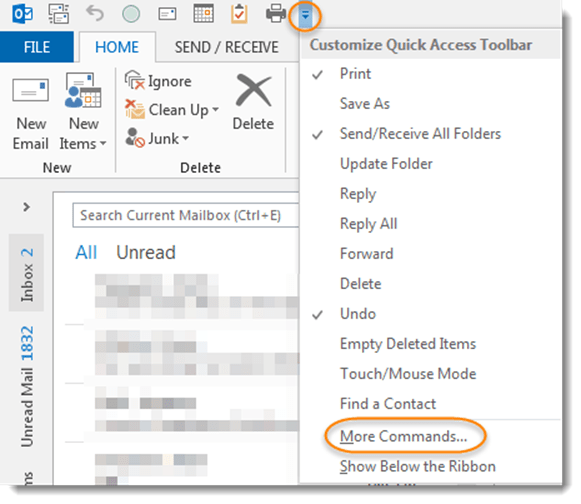
From the Quick Access Toolbar (above the ribbon bar in Outlook), click the drop-down icon to Customize the Quick Access Toolbar, then select More Commands…
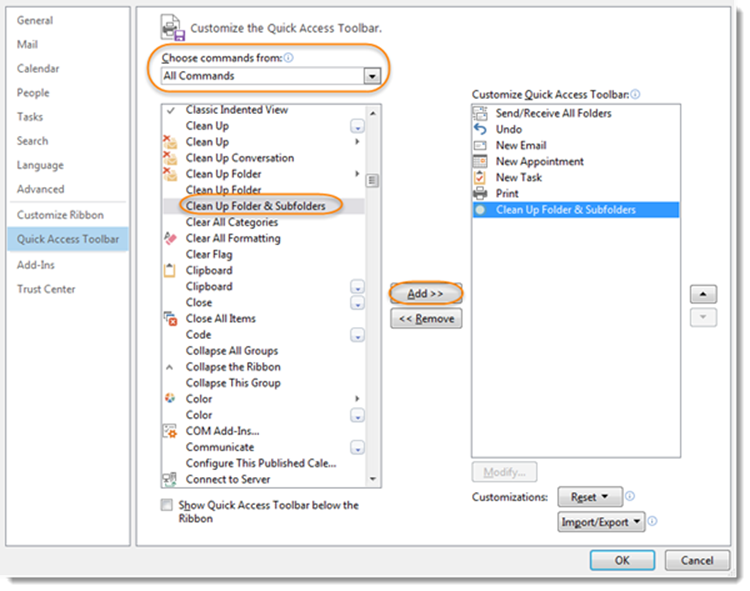
Change the drop-down selection from Popular Commands to All Commands, locate “Clean Up Folder & Subfolders“, then click the Add>> button. This command will now be available in your Quick Access Toolbar and you will be able refresh your folders with the click of just one button.
Be sure to check out the other quick actions you use on a regular basis that can be added to your toolbar.

 One Minute Office Magic