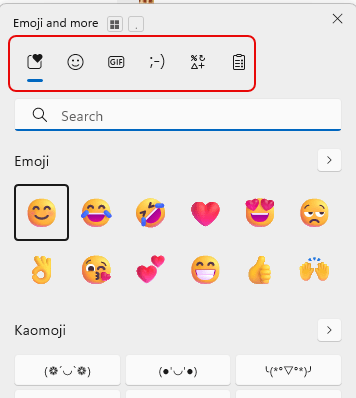
One of my work colleagues shared this tip with me, and I thought it was so good that I’ll pass it along to you. If you press the Window key + . (the period), you’ll get a cool Emoji pop-up screen along with some other useful clickable goodness. Here’s how that works…
Tag: Windows
Minimizing all your open screens at once on Windows
Have you ever been in a situation where you need to minimize all your open screens for some reason… like someone walks into your office and shouldn’t see confidential information on your monitor? There’s a simple keyboard shortcut that will do exactly that…
Using Ctrl+Shift+V to paste text without the underlying formatting
It’s so frustrating when you do Ctrl+C to copy some text, and when you paste it into something like an email, it copies over all the text formatting too. So you head over to Notepad to paste it there (to lose the formatting), and then you copy and paste it into something like Outlook or Teams to get just the text. Today I learned that you can use Ctrl+Shift+V (or Option+Shift+Command+V on a Mac) to paste over content without formatting! Here’s how that works…
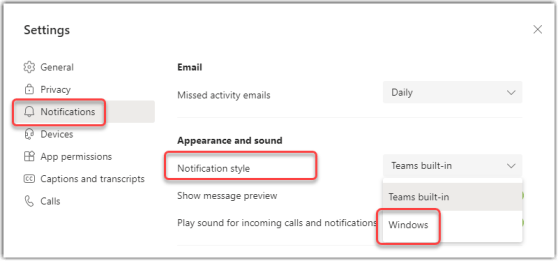
Sending Microsoft Teams notifications to Windows notifications
Depending on how you prefer to work, you might want to consolidate all your system notifications into the Windows notification area (the notification icon in the Windows task bar). Now Microsoft Teams will allow you to set your notifications to go to that area instead of showing up in Teams. Here’s how that works…