Skip to content

One Minute Office Magic

  • Facebook
  • LinkedIn
  • Twitter
  • Instagram

Learning new Microsoft Office tricks in "just a minute"

  • Home
  • About
  • Contact

Tag: Message Preview

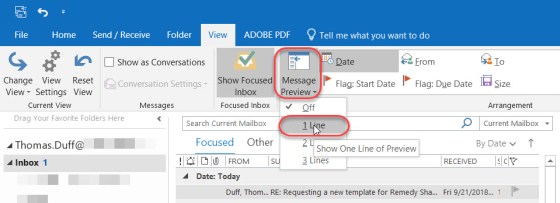
Outlook Message Preview – changing the number of lines to show

If you don’t use the Preview Pane to show an email when you have it highlighted, you likely rely on the Message Preview in the Inbox folder to get some idea as to what the message might be about. If you don’t know, you can change the length of that preview from one to three lines. Here’s how to do it…

Message Preview, Outlook

Search

Text Widget

This is a text widget, which allows you to add text or HTML to your sidebar. You can use them to display text, links, images, HTML, or a combination of these. Edit them in the Widget section of the Customizer.
Blog at WordPress.com.
  • Subscribe Subscribed
    • One Minute Office Magic
    • Join 83 other subscribers
    • Already have a WordPress.com account? Log in now.
    • One Minute Office Magic
    • Subscribe Subscribed
    • Sign up
    • Log in
    • Report this content
    • View site in Reader
    • Manage subscriptions
    • Collapse this bar