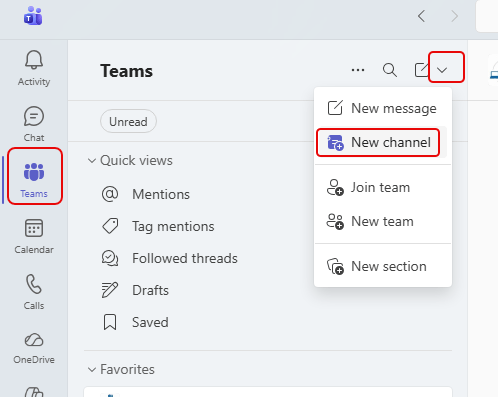
When you’re trying to add a new channel into a Teams workspace, it can be a bit confusing to find the options if you don’t do it regularly. If you add channels this way, it’s WAY too easy. 🙂 Here’s how it works…
Learning new Microsoft Office tricks in "just a minute"
When you’re trying to add a new channel into a Teams workspace, it can be a bit confusing to find the options if you don’t do it regularly. If you add channels this way, it’s WAY too easy. 🙂 Here’s how it works…

When you’re looking at all the Channels in a Microsoft Teams workspace, you may struggle to figure out what they’re for, who the members are, and what’s been done of late. Now you can find all that out in the Channel Information Panel. Here’s how that works…
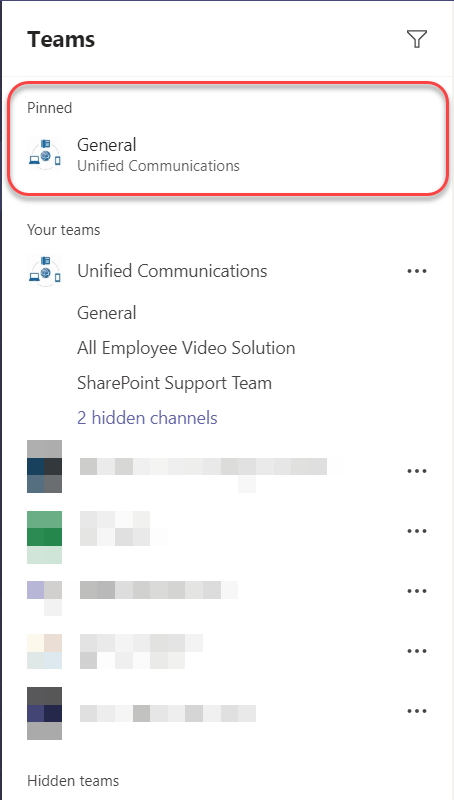
If you have a number of Microsoft Teams workspaces that you are part of, it can be a hassle to stay focused on the few select channels that are meaningful and that need your attention. A recent enhancement will make that much easier now… Pinned Channels in the Microsoft Teams client. Here’s how that works…

I’m happy to see that the ability to cross-post in multiple channels in Microsoft Teams has arrived in our tenant. This will make it much easier to get certain messages out to a wider audience much more easily. This is how it works…
 One Minute Office Magic