Getting a document summary in web-based Microsoft Word

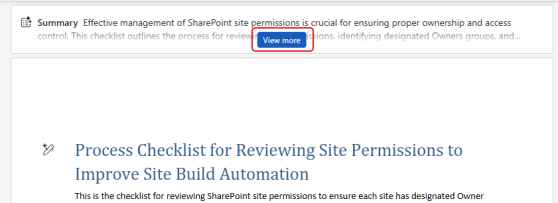
If you are looking at a large document in the browser-based version of Microsoft Word, you might feel a bit overwhelmed when it comes to getting an overall understanding of what it contains. Copilot can help with a Summary at the top of the document, along with a variety of options to tailor your overview to what you need. Here’s what that looks like…
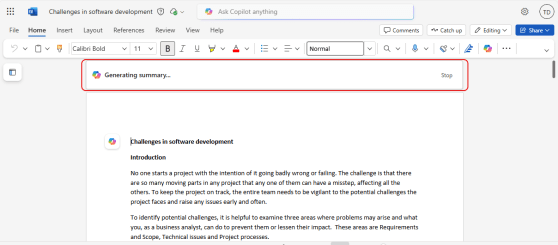
Using Copilot to get a summary of a Word document

Have you ever opened up a large Word document from SharePoint or OneDrive, and you wish you could easily get a summary of the document automatically so that you have some idea of what it contains? Now, Copilot will provide that for you! Here’s what it looks like when you open that large Word doc…

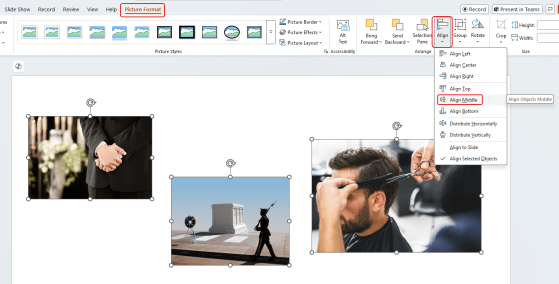
Using the Align feature in Microsoft PowerPoint (and Word)

Have you ever had a number of images on a slide, and you’ve struggled to align them horizontally (or vertically)? You’ve spent way too much time moving things pixel by pixel, and then you wonder if it’s actually perfect? You can make that a lot easier by using the Align feature in PowerPoint (and it’s also available in Word). Thanks to Sandra for sharing this with me. Here’s how it works and looks…

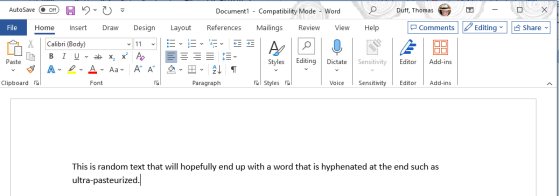
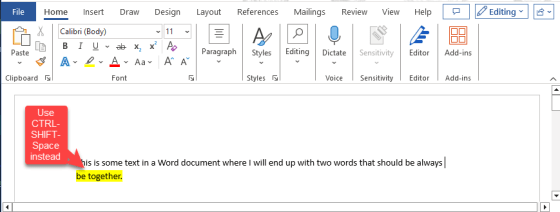
Keeping a hyphenated word together in Microsoft Word

One of my coworkers pointed out another Microsoft Word trick involving keeping words together on the same line. In this case, it’s if you want to keep a compound word (two words separated by a hyphen) together on the same line so it doesn’t appear to be a single word broken at the end of the line with a hyphen. Here’s how you do that…