Automatically formatting a mailto link in an Outlook email

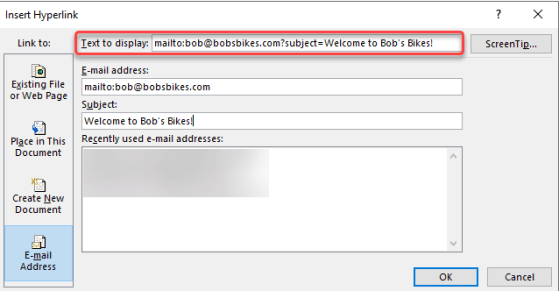
As you may be aware, you can create a clickable hyperlink that opens a new email automatically addressed to someone, along with a subject link. However, sometimes it’s a bit difficult to remember the format and syntax of the link. If you’re doing this in the Outlook client, there’s an easy way to get the link created and formatted properly without having to remember any of the parameters. Here’s how that works…

Showing declined meetings on Outlook on the web

If you’re using Outlook on the web, you have a new feature that can be very useful. You can now choose to have meetings that you decline show up in your calendar, but not mark that time as busy. This is great when you want to be able to get back to a meeting invite that may have files or agenda information that you need to view at a later time. Here’s how that works…

Receiving Shared Calendar notifications in Outlook

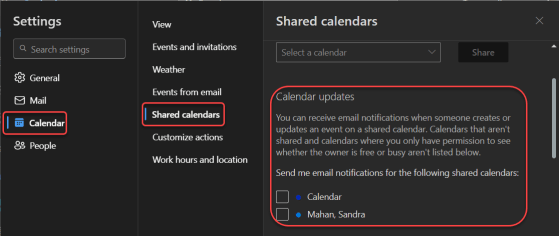
If you are part of a shared Outlook calendar, it can be frustrating to try and keep up with changes to that calendar that you didn’t make. Now, using the web-based Outlook calendar, you can access a new setting that will allow you to receive notifications as changes are made to that shared calendar. Here’s how to set that up…

Changes in selecting emails in Outlook on the web

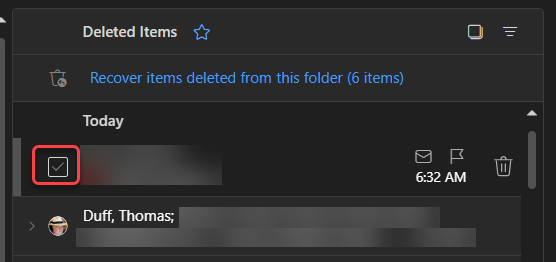
It used to be that in Outlook on the web, you’d see round circles that you could select to perform actions on an email item, such as deleting one or more emails. Microsoft has made a bit of a change in how that now displays and what you need to do to get the circles to appear. Here’s how it works now…

Filtering out calendar entries on Outlook for the web

If you’re like me, you often screen share and demo things for your customers. But when it comes to showing off things like my calendar, there are times when I’d rather not show things that I have marked as private. I recently learned you can filter your calendar display on Outlook for the web. Here’s how that looks…