Episode 274 of the Microsoft 365 Pulse Roadmap webcast is now out on YouTube. Join Tamara Bredemus, Matthew Ruderman, and Thomas Duff as we cover this week’s updates.

Learning new Microsoft Office tricks in "just a minute"
Episode 274 of the Microsoft 365 Pulse Roadmap webcast is now out on YouTube. Join Tamara Bredemus, Matthew Ruderman, and Thomas Duff as we cover this week’s updates.
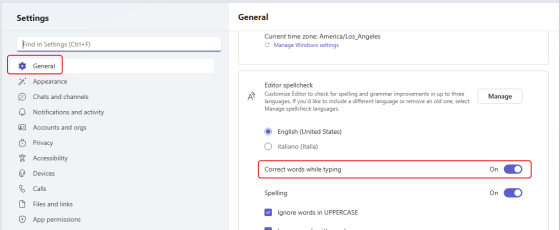
In many of the Microsoft 365 applications like Word or OneNote, autocorrecting a misspelled word is something you’ve come to expect. Microsoft Teams has been an outlier in that it will flag a misspelled word but it won’t correct it. Microsoft is currently rolling out a change that *will* actually autocorrect commonly misspelled words for you. However, it seems to be not-quite-ready-for-prime-time, but I want you to know what you’re looking at when you see it. Here’s how it looks and (sort of) works…

Episode 273 of the Microsoft 365 Pulse Roadmap webcast is now out on YouTube. Join Tamara Bredemus, Matthew Ruderman, and Thomas Duff as we cover this week’s updates.
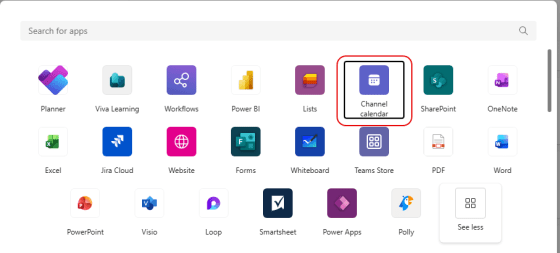
Microsoft has a calendar feature in Teams that is often overlooked. It’s called a Channel Calendar, and it allows you to set up a calendar that is specific to a channel in a Teams workspace. Here’s how that works…

Episode 272 of the Microsoft 365 Pulse Roadmap webcast is now out on YouTube. Join Jennifer Mason, Tamara Bredemus, and Thomas Duff as we cover this week’s updates.
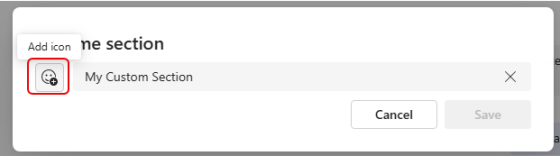
If you use custom sections in your Microsoft Teams client, it can get a little difficult to quickly pick out which custom section name you’re looking for. Now it’s a bit easier, as you can use emojis in those names. Here’s how that looks…
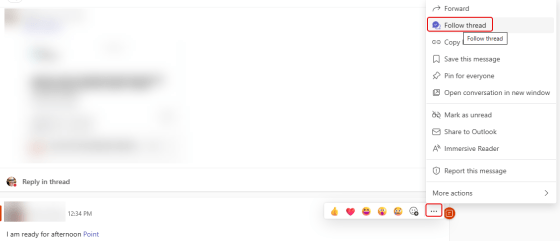
In Microsoft Teams, you will see a Followed Threads option in the Activity pane. This automatically shows you any Teams conversations you’re part of when looking at the Teams option. But you can also use that to follow threads where you’re not explicitly mentioned. Here’s how that works…
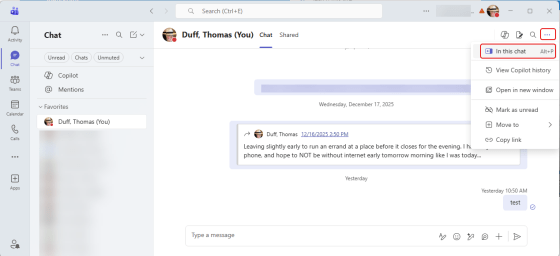
Have you ever been in Microsoft Teams looking for something that you know you chatted with a colleague about, and you’re having a hard time scrolling through all the chat content to find that particular file or link? If you use the chat pop-out icon in a Teams chat, you’ll have a much easier time finding what you’re looking for. Here’s how that works…
 One Minute Office Magic