Have you ever needed to create a new meeting invite on your calendar, but you don’t quite have all the details yet? It’d be nice to be able to create a “draft” entry of that invite to flag it on your calendar so it doesn’t get overridden. Now you can! Here’s how that works…
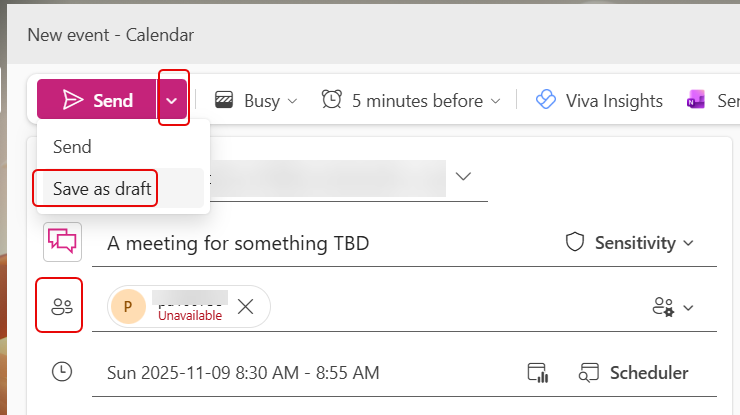
Here I’ve created a new calendar entry that I’d like to save as a draft. To do this, I need to specify at least one attendee. Without an attendee, this option will not appear. I can click the Send dropdown and pick Save as draft:
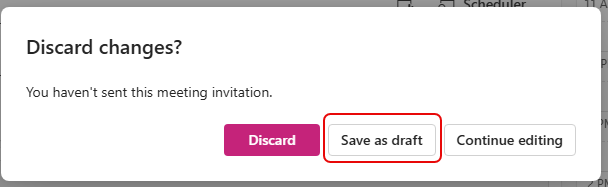
Conversely, if I just try to close the calendar entry (again, with at least one attendee), I’ll get the option to Save as draft there:
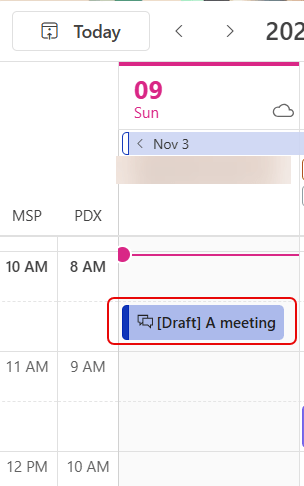
In my calendar, that entry now shows up with the word [Draft} in front of the meeting title. Please be aware that until you go back in and send it, it will not appear on anyone’s calendar except your own:
You can also do this in Classic Outlook, but it’s a bit less intuitive. For more details, check out Save a meeting invite as a draft in Outlook.

 One Minute Office Magic