Skip to content

One Minute Office Magic

  • Facebook
  • LinkedIn
  • Twitter
  • Instagram

Learning new Microsoft Office tricks in "just a minute"

  • Home
  • About
  • Contact

Tag: Reading Pane

Reading Pane Background Image for Outlook on the web

When you’re working in Outlook on the web, you may have noticed that by default, the reading pane is just a blank canvas. If you’d like to “jazz it up a bit”, you can put a background image on the reading pane to add some color. Here’s how that looks and works…

Outlook, Reading Pane

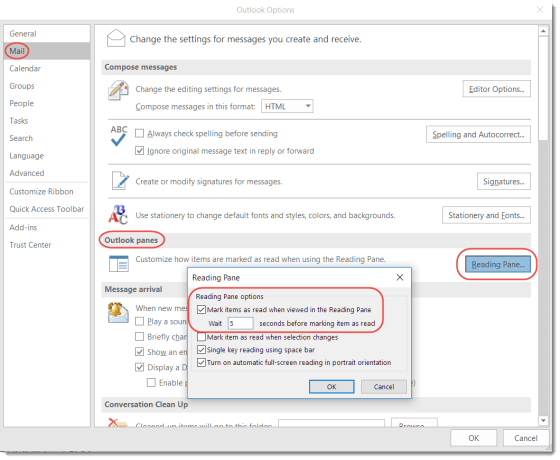
Marking emails as read from the Reading Pane in Outlook

So this was a new one for me… I use the Reading Pane in Outlook quite a bit, but I didn’t realize you could control how long it takes for an email to be marked as Read based on how long it appears in the Reading Pane. Here’s how you do it…

Mark As Read, Outlook, Reading Pane

Search

Text Widget

This is a text widget, which allows you to add text or HTML to your sidebar. You can use them to display text, links, images, HTML, or a combination of these. Edit them in the Widget section of the Customizer.
Blog at WordPress.com.
  • Subscribe Subscribed
    • One Minute Office Magic
    • Join 83 other subscribers
    • Already have a WordPress.com account? Log in now.
    • One Minute Office Magic
    • Subscribe Subscribed
    • Sign up
    • Log in
    • Report this content
    • View site in Reader
    • Manage subscriptions
    • Collapse this bar