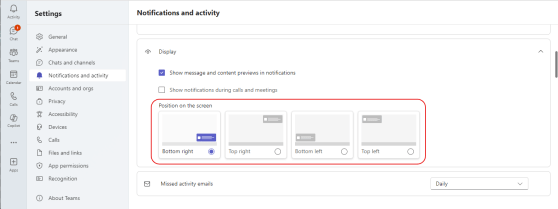
Here’s a new feature (currently rolling out in Teams) that people will probably like… When you get the Teams pop-up notifications for things like chat messages, they always show up in the lower right corner of your screen. Now, you have the option to choose which screen corner they’ll show up in! Here’s how to change your locations…
Tag: Notifications
Turning Microsoft Teams post notifications off
Have you ever found yourself part of a Microsoft Teams post where you keep getting notified when someone replies in the post, and you really don’t want to be bothered to get any more notifications on just that one post? Now you can turn off (or back on) notifications in an individual post in Teams. Here’s how that works…
Getting notifications when an Available/Offline status change occurs in Teams
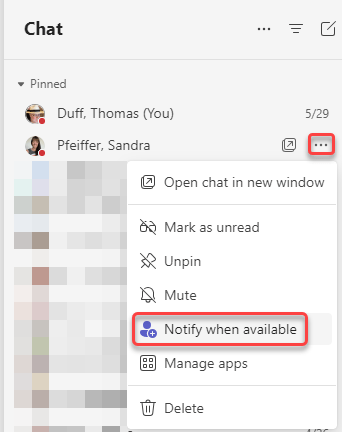
One of the things that people really missed when we moved to New Teams was the ability to get a notification when someone’s status went from Offline to Available. When the Contacts in Teams went away, so did that functionality… but now it’s back! 🙂 You can now set notifications in Teams in two different ways. Here’s how that looks and works…
Microsoft Teams: Usability Improvements to In-Meeting Notifications
One of the things I’ve always found frustrating about Teams meetings is how all the various notifications show up all over the place. Chat messages in the lower-right corner, recording messages as a bar across the top, etc. Now with this set of changes, all the in-meeting notifications will be consistent and show up in a common area. Here’s what it looks like…
Sending Microsoft Teams notifications to Windows notifications
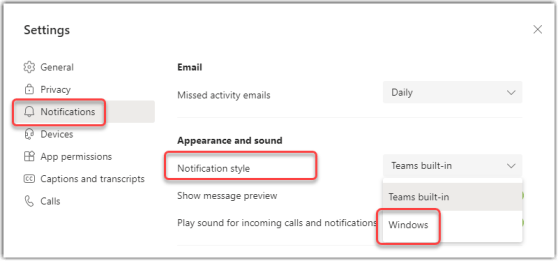
Depending on how you prefer to work, you might want to consolidate all your system notifications into the Windows notification area (the notification icon in the Windows task bar). Now Microsoft Teams will allow you to set your notifications to go to that area instead of showing up in Teams. Here’s how that works…