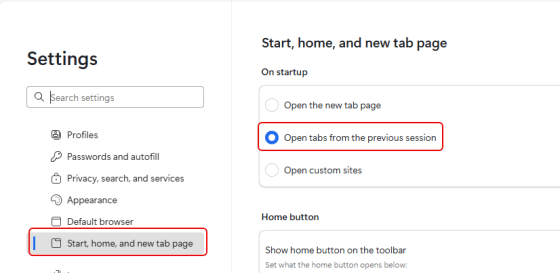
Have you ever had your browser open with all the tabs you’re using on a project, and you inadvertently close the browser (and you lose all your open tabs)? A colleague of mine had that happen today, and I asked if they had the browser set to open with the tabs that were open when the browser was closed. Since they didn’t know about that setting, I figured I’d share that setting with you in Edge, Chrome, and Firebox…
Tag: Browser
Clear your browser cache with CTRL+SHIFT+DEL
Here’s a real quick tip for getting to the settings to clear browser history and cache on any browser you’re using. Instead of trying to find the Settings for that option, just click CTRL+SHIFT+DEL and you’ll go right to the panel that allows you to clear things out.
Sorting your web browser bookmarks
Here’s a way to clean up your bookmarks in your browser.
Restoring Selected Closed Tabs in Internet Explorer
You can be selective with which closed browser tab you re-open.
Restoring Closed Tabs in Your Browser
If you inadvertently close a browser tab that you need, all is not lost.
