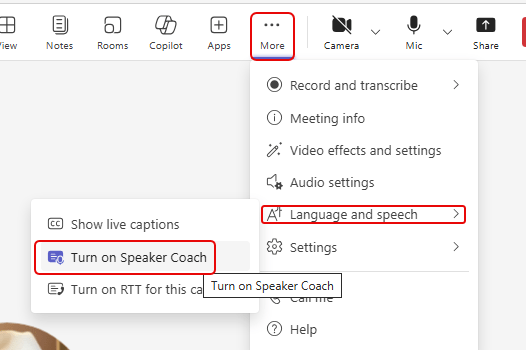
This is a change that makes me a bit sad. The Speaker Coach feature in Microsoft Teams is being retired and will no longer be available by late August, 2025. Apparently this was a Preview feature (I didn’t realize that), and Microsoft has decided not to move the function to general availability…
Category: Microsoft Teams
Updated retention policy for Microsoft Teams meeting attendance reports
It’s possible this is something you’ve never given much thought to, but the attendance reports in Microsoft Teams meetings currently are stored indefinitely. However, Microsoft has made a policy change and now the attendance report for a Teams meeting will have a one-year retention period. Following is the Microsoft notice for this change, and what you’ll need to do in order to retain attendance reports prior to November 1st, 2024…
A different way to get to your emoticons in Microsoft Teams
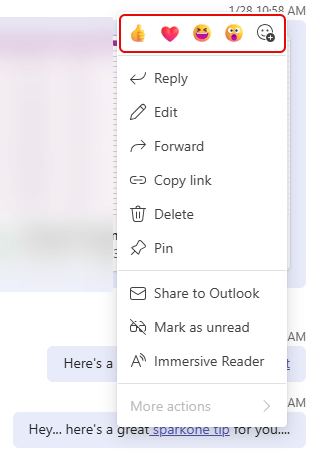
In Microsoft Teams chats and conversations, you’ve been able to hover over a message and head to the upper-right corner for the emoticons and the ellipsis for more options. Now you can get the whole package of emoticons and options by right-clicking on the message. Here’s how that looks…
Adding a hyperlink in a Teams message
As with many things Microsoft, there is usually more than one way to accomplish a task. This particular tip makes it much easier (for me, at least) to add a hyperlink in a Teams message you’re creating. No more hunting for the link icon for formatting… just a simple copy and paste! Here’s how it works…
Forwarding channel messages to other channels in Teams
Have you ever run across a message in a Teams channel and wish you could forward that content to another channel in Teams without having to copy and paste? Now you can by using the Forward feature in a Teams message. Here’s how that works…
Changing the placement of your Microsoft Teams notifications
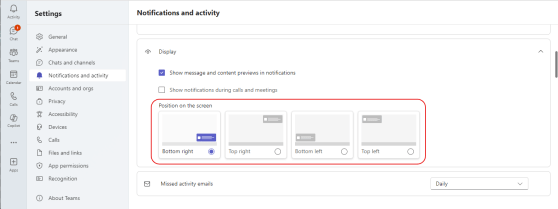
Here’s a new feature (currently rolling out in Teams) that people will probably like… When you get the Teams pop-up notifications for things like chat messages, they always show up in the lower right corner of your screen. Now, you have the option to choose which screen corner they’ll show up in! Here’s how to change your locations…
Microsoft Teams and voice mail greetings
If you get a phone call in Microsoft Teams and you use the default system greeting, there’s a recent change that gives you a bit more confidentiality for external callers. Here’s what’s going on…
Better People search results in Microsoft Teams
Microsoft Teams recently updated the Search feature when it comes to finding content related to specific people. You can now filter based on specific types of results instead of having to wade through everything. Here’s what that looks like…