
Microsoft Forms is a great way to collect information from people, such as feedback after a session. But wouldn’t it be nice if you could “pre-fill” part of the form based on certain information specific to the people who attended a particular session? Now you can using the Pre-Fill Responses feature in Microsoft Forms. Here’s how that works…
In this scenario, we have a presentation feedback form for two sessions… one about SmartSheet by Sandra and one about Microsoft 365 Tips by me. While we could just have people go out and create their response, selecting the presenter and topic, we want to give them a link to the form that already has the presenter and topic fields filled in based on what session they were in. To make this happen, I click on Get Pre-filled URL in the form options:

I get a pop-up at the top of the form so that I can Enable pre-filled answers and enable the link. I click on the option to turn that on:

Once I turn that option on, I can pre-fill responses on the form and get the unique URL that will show the form with those particular responses. In this scenario, I want a Forms URL with Sandra/SmartSheet pre-filled so I can send that to people who attended her session, and a different URL with Tom/Microsoft 365 Tips pre-filled for people who attended my session:

Here’s my pre-filled form for Sandra’s session. Once that’s done, I can click on Get Prefilled Link to get that unique URL:

Here’s the generated URL, and I can copy that link so I can use it to send out a request for feedback to those who were in Sandra’s session:

Once I get that URL, I can repeat that process to get the unique URL for a pre-filled form for people that attended my session.
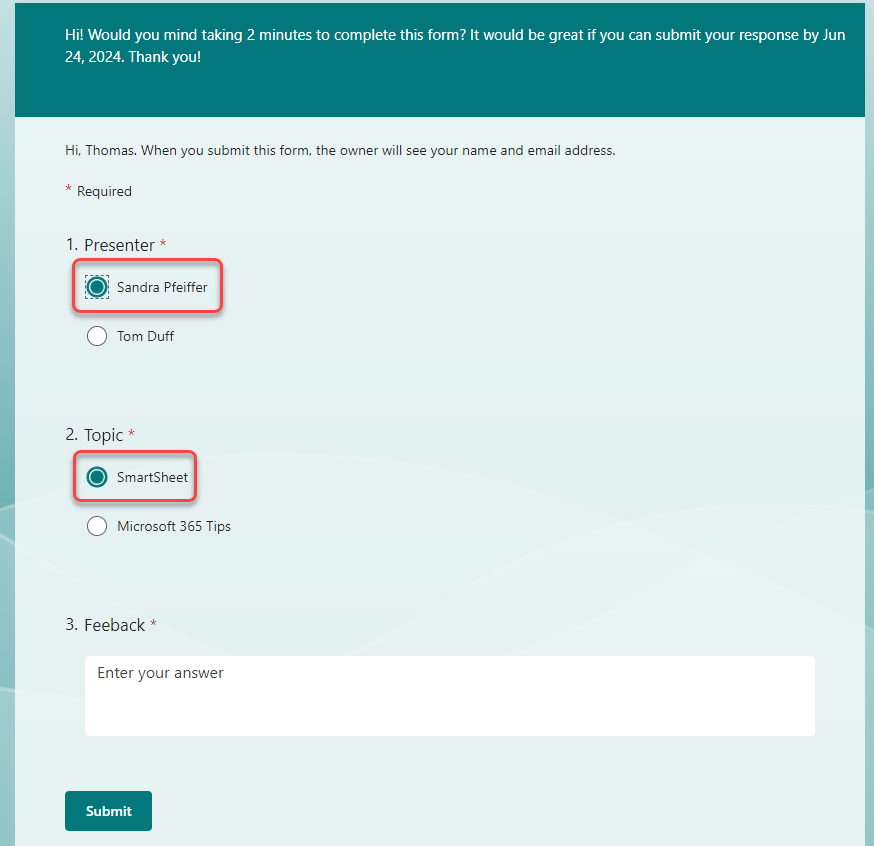
When I use the URL for Sandra’s session, here’s how the form appears to the recipient:
And the other URL I generated will launch the form for people who attended my session:

Do keep in mind that this doesn’t save the form design with a particular set of filled in choices. The pre-fill options are only used to generate those unique URLs.
For more information, check out Pre-fill Responses in your Microsoft Forms.

 One Minute Office Magic
Thanks for the great article on get the pre-filled link and substituting the data. I am doing just that, via a PowerAutomate, however I am finding that cache is prohibiting the correct information to display. Despite the URL showing that it is passing the information, the only way to see the current data is to open the form incognito/inprivate, and with single-sign on, that is prohibitive. Cache shows data from another form. Any ideas?
LikeLike