
If you’re familiar with the Microsoft 365 Search bar at the top of all the M365 applications, you’ll know that once the results come back, there are filter options to narrow down the results, such as Files, Sites, People, etc. Recently, Microsoft added a new filter… Videos. This makes it easier to find that elusive video that’s stored somewhere on SharePoint or OneDrive. Here’s what that looks like…
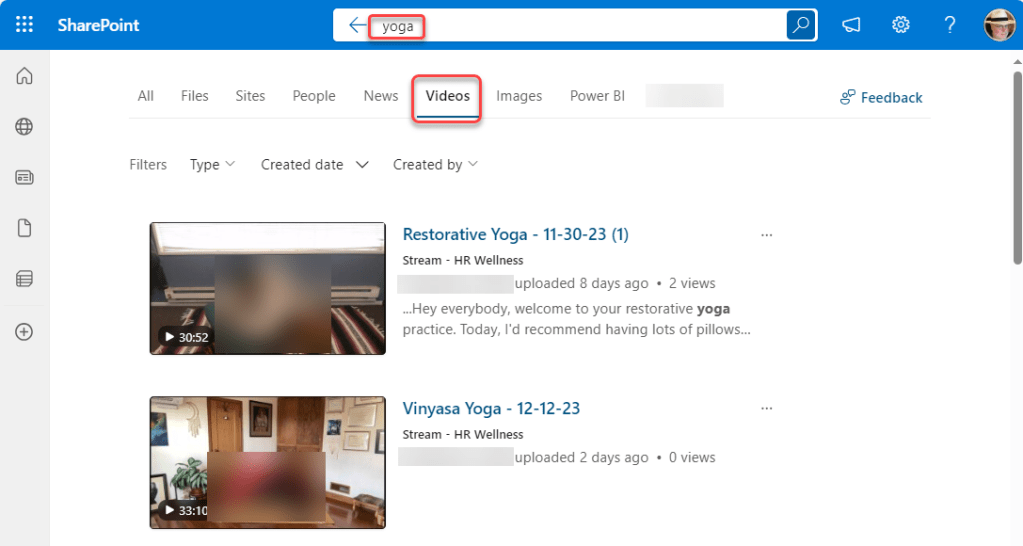
In this example, I’m searching for “yoga” in SharePoint. When the results are returned, I have a number of filters available to narrow down the results. By clicking Videos, my search results only show video files stored in SharePoint or OneDrive that I have access to:
Using the new Stream on SharePoint and OneDrive app also has the M365 Search bar at the top, and you can search for content from there, much like you would in any other M365 application. Once the results are returned, you can use the filters to narrow down to just show videos:

Taking advantage of the Videos tab (or any of the other tabs) is a great way to find your content more quickly without having to scroll through pages of results that may not be relevant to what you’re looking for.

 One Minute Office Magic